Privacy and permissions
By default, your blog is completely public, and can be read by
anyone on the internet. However, if you want to keep it private, you can
do that, too. You can change these settings on the
Settings | Basic tab.
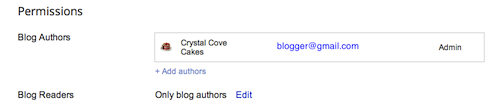
- Under the 'Blog Readers' section, you'll probably see 'Anybody'
selected as the default. When you change this to 'Only these readers,'
you'll get an Add Readers button.
- Click the Add Readers button and then enter the
email address of a person to whom you'd like to grant access to your
blog. To add multiple people, separate their addresses with commas.
- For each address entered, the Google Account associated with that
address will be given access to view your blog. If an address is not
associated with an account, that person will receive an invitation email
with a link allowing them do one of three things:
- Sign in to an existing account.
- Create a new account.
- View your blog as a guest (no account required).

No comments:
Post a Comment